A webhook (also called a web callback or HTTP push API) is an automated method that lets Token.io provide you with real-time updates regarding the status of a single immediate payment initiation. Configuring a Token.io webhook eliminates the need to poll for data to get the latest status and is the method we recommend.
When configured, Token.io webhooks notify you when the status changes for the following:
Single Immediate Payments (v1 and v2)
Variable Recurring Payment Initiation and Variable Recurring Payment Consent Setup
Settlement accounts
Bank outages
The final status of a payment may not be immediately known, so Token.io polls the bank periodically until the final status is available. Polling stops once the final status is received.
An HTTP POST notification will be sent to your configured webhook URL when the Token.io payment status changes.
For Payments v2, the notification will contain an eventType and a payment object. Currently, the only eventType we offer is PAYMENT_STATUS_CHANGED, which is used for both payment creation and payment status updates. The payment object provides similar information to the GET /v2/payments/{paymentId} endpoint, e.g., payment id, memberId, and the current bankPaymentStatus. The bankPaymentStatus is the raw bank status and can be the ISO 20022 payment status code.
For Payments v1, the notification will contain a transactionId (optional, depending on bank support), transferId, refId, and the current transfer status. Optionally, the bank may include the payment status in bankPaymentStatus. The bankPaymentStatus is the raw bank status and can be the ISO 20022 payment status code.
You'll need to configure the event(s) for which you wish to receive webhook notifications, often referred to as 'event subscription'.
To subscribe to an event, make a PUT /webhook/config call and place the details in the body. The following example shows the structure for a Payments v2 webhook.
{
    "config": {

        "type": ["PAYMENT_STATUS_CHANGED"],

        "url": "your-webhook-url.com"

    }

}
The respective fields are defined in the following table:
| Field | Description/Subfields | Required/Optional |
|---|---|---|
| config | Contains the configuration parameters | Required |
type | Specifies the types of webhook to configure, the available values are:
| Required |
| url | Specifies the webhook URL that will receive status updates | Required |
Use PUT /webhook/config to subscribe to SETTLEMENT_ACCOUNT_LOW_BALANCE and set a balance threshold for each settlement account you want to monitor.
// PUT /webhook/config
{
  "config": {
    "url": "https://your-server.example.com/webhooks",
    "type": ["SETTLEMENT_ACCOUNT_LOW_BALANCE"],
    "settlementAccountLowBalanceConfigs": [
      {
        "accountId": "pa:EXAMPLEACCOUNTID:2gFUX1",
        "threshold": "10.00"
      }
    ]
  }
}
Here is a description of the additional fields:
| Field | Description/Subfields | Required/Optional |
|---|---|---|
settlementAccountLowBalanceConfigs | An array with one entry for each settlement account to monitor. Not allowed if you are not subscribed to the type. Subfields: accountId and threshold. | Required if you subscribe to SETTLEMENT_ACCOUNT_LOW_BALANCE |
settlementAccountLowBalanceConfigs[].accountId | The Token ID of one of your settlement accounts. Each account can appear once. | Required |
settlementAccountLowBalanceConfigs[].threshold | A positive decimal in the account's own currency. Maximum 4 decimal places and 15 integer digits. | Required |
We reject the request with an INVALID_ARGUMENT error if:
- You subscribe to
SETTLEMENT_ACCOUNT_LOW_BALANCEwithout a threshold, or send thresholds without subscribing - An
accountIdis blank, appears more than once, or is not one of your settlement accounts - An
thresholdis not a positive decimal, or exceeds the precision limits As with other webhook types, you have one configuration. EachPUTreplaces it, so include your existing types and thresholds every time.
A successful PUT /webhook/config call returns an empty 200 response.
Once configured, you can retrieve your current webhook configuration with a GET /webhook/config call. Because you are limited to one configuration, no request parameters are needed. The response will specify the type and url properties in the config object.
{

    "config": {

        "type": ["PAYMENT_STATUS_CHANGED"],

        "url": "your-webhook-url.com"

    }

}
You can delete your webhook configuration at any time with a DELETE /webhook/config call. No request parameters are required. If successful, an empty 200 response is returned.
The webhook notification will vary according to the type of webhook configured.
If a successful, i.e., 200 response, is not received from the webhook subscriber (TPP), we'll retry the delivery of webhook notifications:
The retries are timed according to an exponential backoff, e.g., 10 minutes, 30 minutes, 70 minutes, 150 minutes, etc, after the initial delivery.
The events will be retried for up to 72 hours from the initial delivery, i.e., approximately ten attempts will be made as per the exponential delay logic.
The retry period may vary based on the load of events to be retried, and the duration of the retry job.
The webhook subscriber (TPP) must return a 200 response when the retry is processed successfully.
For payments, the webhook url you configure will receive an HTTP POST message with the following message headers and payment status payload:
// Headers

    token-signature:84p7oxffpN6fui9FGCq8YWNYPAFqzJTEET_JtnddYRCnZl_Nt7J4QYBGAgJzVr_MK_DFi75CBOlzef0CWGEmBw

    token-event:PAYMENT_STATUS_CHANGED

 // Body

{

    "createdAtMs": 1624649550800,

    "eventType": "PAYMENT_STATUS_CHANGED",

    "id": "c95dd32d-8248-48e8-bbc9-a6391377156e",

    "payment": {

        "id": "pm2:QNNbrYefZhzttPzqMd7nRe2augU:2gFUX1NEHkJ",

        "memberId": "m:yEUkcSaH5G2AXo9dkHtNpHMvoGD:5zKtXEAq",  // memberId sent in the original payment request

        "initiation": {

            "bankId": "mock-redirect",

            "refId": "viudHL9JP1BnaVg",

            "remittanceInformationPrimary": "<sha256: c5ca59f8325234731ceee5f09f0bec86ad3115f635457aad4953c8904eccf8ca>",

            "amount": {

                "currency": "GBP",

                "value": "5.00"

            }

            "localInstrument": "FASTER_PAYMENTS",

            "creditor": {

                "name": "John Smith",

                "sortCode": "122938",

                "accountNumber": "07957365"

            }

            "chargeBearer": "CRED",

            "callbackUrl": "https://auth.dev.Token.io/mock-integration/dumb",

            "callbackState": "BidWZ41bnZbGIfE",

            "returnRefundAccount": "true"

        }

        "bankPaymentId": "nGZJ5Ki4QI3AbIAahDEj",

        "createdDateTime": "2023-02-22T01:15:24.574Z",

        "updatedDateTime": "2023-02-22T01:15:28.019Z",

        "status": "INITIATION_COMPLETED",

        "bankPaymentStatus": "success",

        "statusReasonInformation": "success",

        "refundDetails": {

            "refundAccount":

                "name": "John Smith",

                "sortCode": "122938",

                "accountNumber": "07957365"

        }

    }

}When a TPP makes a GET /transfers call, the latest status will be sent to the TPP and, if TPP has also subscribed to webhooks, the TPP will receive the webhook as well.
For transfers, the webhook url you configure will receive an HTTP POST message with the following message headers and transfer status payload:
// Headers

    token-signature:84p7oxffpN6fui9FGCq8YWNYPAFqzJTEET_JtnddYRCnZl_Nt7J4QYBGAgJzVr_MK_DFi75CBOlzef0CWGEmBw

    token-event:TRANSFER_STATUS_CHANGED

 // Body

{

    "createdAtMs": 1624649550800,

    "id": "c95dd32d-8248-48e8-bbc9-a6391377156e",

    "transferStatusChanged": {

        "refId": "4iWznLG7pgTSWAddN",  // refId sent in the original transfer request

        "bankPaymentStatus": "imdPEIM5LdgxXr1DdUGD", // original status of submitted request

        "status": "SUCCESS", // updated status

        "statusReasonInformation": "AcceptedSettlementCompleted", // see Payment Initiation Status

        "tokenRequestId": "rq:2a1M4FNGFceEUqe43zFJ1DcvFhfe:5zKtXEAq", // original token request ID

        "transferId": "t:GDK27TpvHk7AqjfUMKKqD6RXpusXEztxWbN49Acw43qx:5zKZFPab",

        "transactionId": "PxDqglhrUp5JHL0xGGxn"

    }

}For refunds, the headers and payload are structured like this:
// Headers

    token-signature:84p7oxffpN6fui9FGCq8YWNYPAFqzJTEET_JtnddYRCnZl_Nt7J4QYBGAgJzVr_MK_DFi75CBOlzef0CWGEmBw

    token-event:REFUND_STATUS_CHANGED

// Body

{

    "createdAtMs": 1624649550800,

    "id": "c95dd32d-8248-48e8-bbc9-a6391377156e",

    "refundStatusChanged": {

        "refundId": "rf:2L6yrx8cn2CMdVm6x5y6gtFZAG9J:2gFUX1NDcm", // refundId sent in the original refund request

        "memberId": "m:3x4aiZ1mg9foVJiJ9LVG1LybGUKA:5zKtXEAq", // memberId sent in the original refund request

        "status": "INITIATION_PROCESSING", // updated status

        "bankTransactionID": "3321720220503"", // bank generated unique identifier for the refund

        "bankPaymentStatus": "AcceptedSettlementCompleted", // payment status returned by the bank

        refId": "RFND1700164760",

    },

}For variable recurring payments, the headers and payload are structured like this:
// Headers

    token-signature:84p7oxffpN6fui9FGCq8YWNYPAFqzJTEET_JtnddYRCnZl_Nt7J4QYBGAgJzVr_MK_DFi75CBOlzef0CWGEmBw

    token-event:VRP_STATUS_CHANGED

 // Body

{

    "createdAtMs": 1624649550800,

    "id": "c95dd32d-8248-48e8-bbc9-a6391377156e",

    "vrpStatusChanged": {

        "vrpId": "vrp:4MJsqrrZ34wxDENP6CvNHS42uW7L:2gFUX1NEJsr",  // vrpId sent in the original transfer request

        "bankVrpId": "3adb56d8-87dc-42e8-8f28-3511beb87e18", // bank generated unique identifier for the initiated payment

        "consentId": "vc:kdakdhajsdah:kdjskjd", // VRP consent for which the payment was initiated

        "status": "INITIATION_COMPLETED", // current status of the VRP

        "bankVrpStatus": "AcceptedSettlementCompleted", // payment status returned by the bank

    }

}
If available, vrpStatusChanged.statusReasonInformation will display the status reason information returned by the bank.
For Variable Recurring Payment consent setup, the headers and payload look like this:
// Headers

    token-signature:84p7oxffpN6fui9FGCq8YWNYPAFqzJTEET_JtnddYRCnZl_Nt7J4QYBGAgJzVr_MK_DFi75CBOlzef0CWGEmBw

    token-event:VRP_CONSENT_STATUS_CHANGED

 // Body

{

    "createdAtMs": 1624649550800,

    "id": "c95dd32d-8248-48e8-bbc9-a6391377156e",

    "vrpConsentStatusChanged": {

        "vrpConsentId": "vc:zjiGVpY8Atvb3hZQmhH5pbiW4dv:2gFUX1NDeAA", // id of initiated VRP Consent
        "bankVrpConsentId": "VRP-3cdc098f-a97f-4006-b0e7-191df0d17989", // bank generated unique identifier for the initiated VRP Consent

        "status": "AUTHORIZED", // current status of the VRP Consent

        "bankVrpConsentStatus": "Authorized", // VRP consent status returned by the bank

    }

}For Payins, the headers and payload look like this:
// Headers

    token-signature:84p7oxffpN6fui9FGCq8YWNYPAFqzJTEET_JtnddYRCnZl_Nt7J4QYBGAgJzVr_MK_DFi75CBOlzef0CWGEmBw

    token-event:VIRTUAL_ACCOUNT_CREDIT_RECEIVED

// Body

{

    "createdAtMs": 1734353348379,

    "id": "7a56bd7b-9ac1-4fbf-beba-9e1236817588",

    "virtualAccountCreditReceived": {

        "providerPaymentId": "P2100JDH0C",  // Token.io-generated unique identifier

        "amount": "13.0",

        "currency": "EUR",

        "paymentCreatedTime": "2024-12-16T12:49:07.915+0000",  // time the payment was created

        "description": "Payment from M.OU MME SEPA: test call 111",  // description of the payout

        "providerAccountId": "A2100CJ9WT",  // Token.io-generated unique identifier

        "locaInstrument": "SEPA",  // payment rail

        "debtorInformation": {

            "name": "John James" // name of the debtor

        },

        "creditorInformation": {

            "name": "Jane James" // name of the creditor

        },

        "memberId": "m:4EyG54JjJecbDt8xrwSXpDPq5feq:5zKtXEAq" // Token.io-assigned member id of the TPP

    }

}For Payouts, the headers and payload look like this:
// Headers

    token-signature:84p7oxffpN6fui9FGCq8YWNYPAFqzJTEET_JtnddYRCnZl_Nt7J4QYBGAgJzVr_MK_DFi75CBOlzef0CWGEmBw

    token-event:PAYOUT_STATUS_CHANGED

// Body

{

    "createdAtMs": 1729244291611,

    "id": "b23bd2f3-ff11-4f00-9580-d27d51e801fd",

    "payoutStatusChanged": {

        "payoutId": "po:yj6sSEf7ZYFP8yxN6XWi1KkMEcB:2gFUX1NDget",  // Token.io-generated unique identifier

        "bankTransactionId": "P210S4AXE6",  // bank-generated unique identifier

        "refId": "TX11DF2AE9EA2D1BXT", // TPP-generated reference identifier for the token

        "status": "INITIATION_COMPLETED", // payout initiation status

        "bankPaymentStatus": "VALIDATED", // raw bank status

        "memberId": "m:3nDxMMfKdwp3waRLgNWGcJie99bk:5zKtXEAq" // Token.io-assigned member id of the TPP

    }

}For Settlement rules, the headers and payload are structured like this:
// Headers

    token-signature:84p7oxffpN6fui9FGCq8YWNYPAFqzJTEET_JtnddYRCnZl_Nt7J4QYBGAgJzVr_MK_DFi75CBOlzef0CWGEmBw

    token-event:SETTLEMENT_RULE_PAYOUT_EXECUTION_FAILED

// Body

{

    "createdAtMs": 1729212980771,

    "id": "7db091c0-4abd-4cbe-a474-c97732b02db1",

    "settlemenRulePayoutExecutionFailed": {

        "payerAccountId": "pa:4Uu9YCU5ZuyLJWsWhGT64Abx8e4b:2gFUX1NE15g",  // Token.io-generated id of the payer Settlement account

        "settlementRuleId": "b24dee05-f9ab-4cea-96e1-a8cc0f254588",  // Token.io-generated id of the settlement rule

        "reasonOfFailure": "Payer account doesn't have sufficient funds to do the payout.", // reason settlement has failed

    }

}We send this webhook when a payout or refund takes the balance of a settlement account to or below the threshold you set. Use it to top up the account before later payouts or refunds fail because of insufficient funds.
When we send it
- We check the balance after a payout or refund reaches
INITIATION_COMPLETED. Other statuses do not move funds, so they do not trigger a check. - We compare the available balance with your threshold. We send the webhook if the balance is less than or equal to the threshold.
- We send one webhook each time the balance crosses the threshold. We do not repeat it for further payouts or refunds while the balance stays below the threshold.
- We send a new webhook when a payout or refund takes the balance to or below the threshold again, after the balance was above the threshold before that payment.
What does not trigger it
- Incoming payments and top-ups do not trigger a check. We check again when the next payout or refund completes.
- There is no scheduled or periodic check.
- If you set a threshold while the balance is already at or below it, the next payout or refund to complete sends the webhook.
- If we cannot read the balance, we skip the check and check again when the next payout or refund completes.
Example
This example uses a threshold of £10.
| Step | Event | Balance | Webhook |
|---|---|---|---|
| 1 | Starting balance | £11 | - |
| 2 | Payout of £3 completes | £8 | Sent |
| 3 | Payout of £3 completes | £5 | Not sent. Already notified. |
| 4 | You top up £10 | £15 | - |
| 5 | Payout of £8 completes | £7 | Sent. The balance was above the threshold before this payout. |
| 6 | You top up £2 | £9 | - |
| 7 | Payout of £2 completes | £7 | Not sent. The balance was not above the threshold before this payout. |
Notification
Each notification is an HTTP POST with the token-signature and token-event headers. The token-event value is SETTLEMENT_ACCOUNT_LOW_BALANCE. Validate the signature as described in Webhook signature validation.
// Headers

    token-signature:84p7oxffpN6fui9FGCq8YWNYPAFqzJTEET_JtnddYRCnZl_Nt7J4QYBGAgJzVr_MK_DFi75CBOlzef0CWGEmBw

    token-event:SETTLEMENT_ACCOUNT_LOW_BALANCE

// Body

{
  "id": "e8c1f7a2-5b3d-4c19-9f60-2a7d1c3b8e45",
  "createdAtMs": "1762000000000",
  "eventType": "SETTLEMENT_ACCOUNT_LOW_BALANCE",
  "settlementAccountLowBalance": {
    "memberId": "m:EXAMPLEMEMBERID:5zK",
    "accountId": "pa:EXAMPLEACCOUNTID:2gFUX1",
    "balance": "9.00",
    "threshold": "10.0000",
    "currency": "GBP",
    "checkedAtMs": "1762000000000"
  }
}| Field | Description |
|---|---|
id | Unique ID of the event. |
createdAtMs | When we created the event, in milliseconds since the Unix epoch. |
eventType | SETTLEMENT_ACCOUNT_LOW_BALANCE. |
settlementAccountLowBalance.memberId | Your member ID. |
settlementAccountLowBalance.accountId | The settlement account that reached its threshold. |
settlementAccountLowBalance.balance | The available balance when we checked, as a decimal string. |
settlementAccountLowBalance.threshold | The threshold you configured, as a decimal string. |
settlementAccountLowBalance.currency | The currency of the account. |
settlementAccountLowBalance.checkedAtMs | When we checked the balance, in milliseconds since the Unix epoch. |
The notification does not include account numbers or other account details. Retries follow the same policy as other webhooks. Return a 200 response once you have processed the notification.
For bank outage, the headers and payload look like this:
// Headers

    token-signature:84p7oxffpN6fui9FGCq8YWNYPAFqzJTEET_JtnddYRCnZl_Nt7J4QYBGAgJzVr_MK_DFi75CBOlzef0CWGEmBw

    token-event:BANK_OUTAGE_STATUS_CHANGED

// Body

{

    "createdAtMs": 1624649550800,

    "id": "c95dd32d-8248-48e8-bbc9-a6331977156e",

    "bankOutageStatusChanged": {

        "bankId": "ob-iron",  // bank-generated unique identifier

        "bankName": "Iron Bank",  // unique name for the bank

        "previousOutageStatus": "AVAILABLE", // original status of submitted requested, this is the default

        "currentOutageStatus": "COMPLETE_OUTAGE" // updated status, the current time lies between the start time and end time of the maintenance window

    }

}Once you've subscribed to your desired webhook event(s) with the Token.io API, it's good practice to validate the signature included in any received webhooks to verify that the webhook was sent by Token.io, not a third party, and has not been tampered with.
In the examples above, the signature can be found within the headers, highlighted as token-signature. The Token.io-generated signature is based on the response using ED25519.
The message to be verified is the body of the HTTP POST response, as seen in the Webhook notifications examples above.
Applying the signature and the public key, you can verify the response payload. The essential structure in node.js using node-forge library will look like this:
const isValid = forge.pki.ed25519.verify({

    message: {message},

    encoding: 'binary',

    publicKey: {publicKey},

    signature: {signature}

});
The validation components are defined in the following table.
| Parameter | Description |
|---|---|
message | Message found as body of the response |
publicKey | Token.io public key using the ED25519 algorithm |
signature | A signature generated by Token.io using the ED25519 cryptographic algorithm, found in the response headers. |
If you want to use forge with node.js, it's available through npm at: https://npmjs.org/package/node-forge.
Sample scripts for JavaScript and Java are included below. However, these are strictly examples. You will need to construct your own solution with the appropriate encoding algorithm and public key.
You can obtain the Token.io Public Key from the Dashboard under Settings > Member Information.
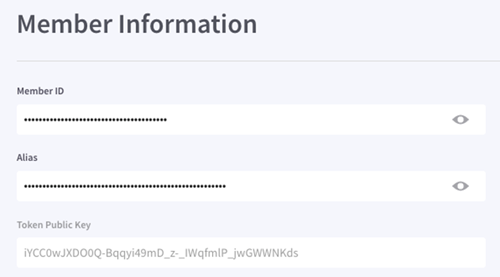
The following are examples for Payments v1 and v2 webhook signature validation.
const forge = require('node-forge')

const stringify = require('fast-json-stable-stringify')

const rawSignature = "RM7lImo155tj-vvPB6GQIcpta2THRY6iD4xvvDBR2JWqaW0p4DQjYzgNqzsT94u1pzKiVPLWb4OG-gkgpvrkDQ";
// raw signature

const rawMessage = {"createdAtMs":"1710275877232","eventType":"PAYMENT_
STATUS_CHANGED","id":"f1714d82-902d-4ed4-a066-d2b73bec970e","payment":
{"createdDateTime":"2024-03-12T20:37:56.888Z",
"id":"pm2:3H27eNf7E665oWoUT2ULBeKXG8hS:2gFUX1NDd9r", "initiation":
{"amount":{"currency":"GBP","value":"5.00"},"bankId":"mock-redirect"
,"callbackState":"CallbackState1710275870","callbackUrl":
"https://auth.dev.Token.io/mock-integration/dumb","creditor":
{"accountNumber":"12345678","address":{"addressLine":["delivery address
1","delivery address 2"], "buildingNumber":"1","country":"Deliveryland"
,"countrySubDivision":["Delivery state","Delivery County"],"postCode":"11111",
"streetName":"Delivery St.","townName":"Delivery Town"},"name":"Clara
Creditor","sortCode":"123456"},"localInstrument":"FASTER_PAYMENTS",
"refId":"4074603r@1710275870","remittanceInformationPrimary":"RemittancePrimary
:SETTLEMENT_FAILED","remittanceInformationSecondary"
:"RemittanceSecondary1710275870","returnRefundAccount":
true},"memberId":"m:2LcjDLzMnMRVUsqhMxoYm3dJFsUY:5zKtXEAq",
"status":"INITIATION_REJECTED","statusReasonInformation":"Error during payment
initiation: INVALID_ARGUMENT: {\"message\":\"Wystąpił błąd\",\"details\":
[\"Characters åäöÅÄÖ are not allowed\"]}","updatedDateTime":"2024-03-12T20:37:56.946Z"}}; // raw messageZ

const payload = stringify(rawMessage.replace(/\\+\"/g, '"'))

const tknPublicKey = "4qY7lqQw8NOl9gng0ZHgT4xdiDqxqoGVutuZwrUYQsI"; // token public key

// actual validation

const isValid = forge.pki.ed25519.verify({

    message: payload,

    encoding: 'utf8',

    publicKey: bufferKey(tknPublicKey),

    signature: bufferKey(rawSignature)

})

function bufferKey(key) {

    const segmentLength = 4;

    const string = key.toString();

    const newLength = Math.ceil(string.length / segmentLength)*segmentLength;

    const base64Buffer = string.padEnd(newLength,'=')

         .replace(/-/g, '+')

         .replace(/_/g, '/');

    const base64 = Buffer.from(base64Buffer,'base64');

    return new Uint8Array(base64);

}
package io.token.webhook.client

import static java.nio.charset.StandardCharsets.UTF_8;

import com.google.common.io.BaseEncoding;

import java.io.IOException;

import java.security.GeneralSecurityException;

import java.security.KeyFactory;

import java.security.PublicKey;

import java.security.Security;

import java.security.Signature;

import java.security.spec.KeySpec;

import java.security.spec.X509EncodedKeySpec;

import org.bouncycastle.asn1.edec.EdECObjectIdentifiers;

import org.bouncycastle.asn1.x509.AlgorithmIdentifier;

import org.bouncycastle.asn1.x509.SubjectPublicKeyInfo;

import org.bouncycastle.jce.provider.BouncyCastleProvider;

public class VerificationSnippet {

    static {
        Security.addProvider(new BouncyCastleProvider());

    }

    private static final BaseEncoding ENCODING = BaseEncoding.base64Url().omitPadding();

    public static boolean validateTokenSignature(String payload, String signature, String tokenPublicKey) throws GeneralSecurityException,

        IOException {

PublicKey publicKey = toPublicKey(ENCODING.decode(tokenPublicKey));

Signature engine = Signature.getInstance("EdDSA");

byte[] binPayload = payload.getBytes(UTF_8);

byte[] binSignature = ENCODING.decode(signature);

engine.initVerify(publicKey);

engine.update(binPayload);

return engine.verify(binSignature);

    }

    private static PublicKey toPublicKey(byte[] publicKey) throws GeneralSecurityException,

        IOException {

    KeyFactory keyFactory = KeyFactory.getInstance("Ed25519");

    SubjectPublicKeyInfo pubKeyInfo = new SubjectPublicKeyInfo(new
AlgorithmIdentifier(EdECObjectIdentifiers.id_Ed25519), publicKey);

    KeySpec keySpec = new X509EncodedKeySpec(pubKeyInfo.getEncoded());

    return keyFactory.generatePublic(keySpec);

    }

}
If you have any feedback about the developer documentation, please contact devdocs@token.io